Build Your Own Shell in Go
A couple of weeks ago, I started learning Go. This is a language I’ve been wanting to learn for a while, and now I have a need for it! So I took a couple of tutorials, but because learning is better when you build something, I decided to learn by building my own shell.
Please note that this will be a simple shell, but strong enough to:
- help you get started or get better at Go
- understand how your terminal actually works
In this post, I’ll walk you through creating a basic but functional shell in Go.
What is a Shell?
A shell is a program that takes commands from the keyboard and gives them to the operating system to perform. It’s the interface between you and the operating system. Popular shells include bash, zsh, and fish.
What We Will Build
We will build a shell following these steps:
- Building the simplest possible shell
- Adding support for arguments
- Adding built-in commands like
cd - Adding support for piped commands
- Handling signals like
CTRL+C - Adding command history support
Don’t worry if some of these terms sound unfamiliar, I try to cover everything step by step. Let’s get started!
1. Building the Simplest Possible Shell
We will build the simplest possible shell first and add on top of it. For a simple shell, it should be able to receive commands and use our OS to execute them.
Reading Input
We want to be able to execute one command after another, so we will use an infinite loop that is constantly reading commands and executing them
Exit Support
Even if this is the simplest shell, we need to provide a way to terminate the program, so we’re adding an ‘exit’ custom command.
Executing Commands
To execute commands we will use the os/exec package. We need to send the command, but we also need to wire up
the standard streams (stdout and stderr).
    cmd.Stdout = os.Stdout
    cmd.Stderr = os.Stderr
These two lines handle stream redirection, which is a fundamental concept in Unix-like systems. Every process has three standard streams:
- stdin (standard input) - where input comes from
- stdout (standard output) - where normal output goes
- stderr (standard error) - where error messages go
By assigning os.Stdout and os.Stderr to our command’s output streams, we’re telling Go: “Whatever this command prints, send it directly to the terminal.” Without this wiring, the command’s output would be lost in the void.
We will also catch the exception, then if a user types a command that doesn’t exist our own OS will throw an error.
Here’s our simplest shell so far:
package main

import (
	"bufio"
	"fmt"
	"os"
	"os/exec"
	"strings"
)

func main() {

	// read a line of input from the user
	reader := bufio.NewReader(os.Stdin)
	for {
		// display the prompt
		fmt.Print("> ")
		input, _ := reader.ReadString('\n')
		input = strings.TrimSpace(input)

		if input == "exit" {
			os.Exit(0)
		}
		if input == "" {
			continue
		}
		// run command
		cmd := exec.Command(input)
		cmd.Stdout = os.Stdout
		cmd.Stderr = os.Stderr
		err := cmd.Run()
		if err != nil {
			fmt.Println(err)
		}
	}

}
2. Add Support for Arguments
Next, we will extend our shell to support arguments, for example it should support commands like ls -ltr. For that, we will
simply split the input by spaces, the first string in the array will be the command and the rest will be the arguments.
That would be something like this:
args := strings.Fields(input)
cmd := exec.Command(args[0], args[1:]...)
As the shell is starting to get bigger, let’s add a function to handle all the input parsing. This is how our shell looks so far:
package main

import (
	"bufio"
	"fmt"
	"os"
	"os/exec"
	"strings"
)

func parseInput(input string) (string, []string) {
	// remove empty spaces from the input
	input = strings.TrimSpace(input)

	// split input
	parts := strings.Fields(input)

	if len(parts) == 0 {
		return "", nil
	}

	// create commands, first string is the command and the rest are arguments
	command := parts[0]
	args := parts[1:]

	return command, args
}

func main() {

	// read a line of input from the user
	reader := bufio.NewReader(os.Stdin)

	for {
		// display the prompt
		fmt.Print("> ")
		input, _ := reader.ReadString('\n')
		command, args := parseInput(input)

		if command == "exit" {
			os.Exit(0)
		}
		if command == "" {
			continue
		}
		// run command
		cmd := exec.Command(command, args...)
		cmd.Stdout = os.Stdout
		cmd.Stderr = os.Stderr
		err := cmd.Run()
		if err != nil {
			fmt.Println(err)
		}
	}
}
3. Add Support for Built-in Commands
When we execute a regular command like ls or grep, our shell:
- Creates a child process (fork)
- The child process runs the command
- The child process exits
Any changes the child process makes to its environment (like current working directory) only affect that child process,
not the parent shell. Hence, commands like cd, exit, alias, source, etc need to be implemented as
built-in commands that run directly in the parent shell process.
For our shell, we will only implement cd but the other commands could be implemented in a similar fashion. For that let’s
use os.Chdir(path). Also, note that now we need to define a flow for built-in commands and non-builtin commands, we will
do that using a switch
This is how our shell looks so far.
package main

import (
	"bufio"
	"fmt"
	"os"
	"os/exec"
	"strings"
)

func parseInput(input string) (string, []string) {
	// remove empty spaces from the input
	input = strings.TrimSpace(input)

	// split input
	parts := strings.Fields(input)

	if len(parts) == 0 {
		return "", nil
	}

	// create commands, first string is the command and the rest are arguments
	command := parts[0]
	args := parts[1:]

	return command, args
}

func executeCdCommand(args []string) {
	var path string
	if len(args) == 0 {
		path = os.Getenv("HOME")
	} else {
		path = args[0]
	}
	err := os.Chdir(path)
	if err != nil {
		fmt.Println(err.Error())
	}
}

func executeNotBuiltInCommand(command string, args []string) {
	cmd := exec.Command(command, args...)
	cmd.Stdout = os.Stdout
	cmd.Stderr = os.Stderr

	err := cmd.Run()
	if err != nil {
		fmt.Println(err.Error())
	}
}

func main() {

	// read a line of input from the user
	reader := bufio.NewReader(os.Stdin)

	for {
		fmt.Print("> ")
		input, _ := reader.ReadString('\n')
		command, args := parseInput(input)

		switch command {
		case "":
			continue
		case "exit":
			os.Exit(0)
		case "cd":
			executeCdCommand(args)
		default:
			executeNotBuiltInCommand(command, args)
		}
	}
}
4. Add Support for Piped Commands
In Unix shells, the pipe operator | lets you chain commands together, feeding one command’s output into the next, so
if we run ls -l | grep "txt" | wc -l, this counts how many .txt files are in a directory by:
- Listing files (ls -l)
- Filtering for “txt” (grep “txt”)
- Counting the results (wc -l)
The challenge now, is that our current shell only supports one command at a time. To support pipes, we will need to:
- Parse multiple commands separated by |
- Connect them so output flows from one to the next
- Handle special cases (like builtin commands that shouldn’t be piped)
We will do the following changes:
-
Commands Become structs: Instead of just strings, each command is now a structured object. This makes it easier to work with multiple commands
type Command struct { name string args []string } -
Smart Parsing: When we type
ls | grep txt, the parser should split on | and creates two Command objects.func parseInput(input string) ([]Command, error) { pipedInputs := strings.Split(input, "|") // ... build a Command for each part } -
Pipeline Execution: this is where most of the pipe logic will reside:
- if there is just one command -> run it normally
- if there are multiple -> connect their inputs/outputs like a chain
-
Protect Builtin commands: In our shell builtin commands will not be chainable, for example, you can’t pipe
cdorexit
Understanding Input/Output Chaining
When we chain commands with pipes, we’re connecting their standard streams. Here’s how it works:
When you create a pipe, you get two ends:
- A write end (output)
- A read end (input)
Building the Chain
For a command like ls | grep txt | wc -l, we need to:
-
Create pipes between commands:
ls → [pipe1] → grep txt → [pipe2] → wc -l -
Connect stdout to stdin:
lswrites to pipe1 (stdout → pipe1.write)grepreads from pipe1 and writes to pipe2 (pipe1.read → stdin, stdout → pipe2.write)wcreads from pipe2 (pipe2.read → stdin)
-
Terminal connections:
- First command (
ls) reads from terminal stdin - Last command (
wc -l) writes to terminal stdout - Any errors go to terminal stderr
- First command (
In Go:
// Get output pipe from first command
stdout, _ := cmds[0].StdoutPipe()
// Connect it to input of second command
cmds[1].Stdin = stdout
This creates a direct channel where bytes written to cmds[0].Stdout become available to read from cmds[1].Stdin.
Use Start() instead of Run()
One additional change that we need to make is to migrate to use cmd.Start() (non-blocking) because all commands must
run simultaneously. If we used Run() (blocking last implementation), the first command would finish completely
before the second one starts, breaking the pipe connection.
Here is the pipes implementation
package main

import (
	"bufio"
	"fmt"
	"os"
	"os/exec"
	"strings"
)

type Command struct {
	name string
	args []string
}

func parseInput(input string) ([]Command, error) {
	// remove empty spaces from the input
	input = strings.TrimSpace(input)
	if input == "" {
		return []Command{}, nil
	}

	// split input by |
	pipedInputs := strings.Split(input, "|")
	commands := make([]Command, 0, len(pipedInputs))

	// per each piped command identify command and args
	for _, pipedInput := range pipedInputs {
		pipedInput := strings.TrimSpace(pipedInput)
		parts := strings.Fields(pipedInput)

		if len(parts) == 0 {
			return []Command{}, fmt.Errorf("invalid input: %s", pipedInput)
		}
		command := parts[0]
		args := parts[1:]
		commands = append(commands, Command{command, args})
	}
	return commands, nil
}

/*
*
function to execute "cd" as a built-in command
*/
func executeCdCommand(args []string) error {
	var path string
	if len(args) == 0 {
		path = os.Getenv("HOME")
	} else {
		path = args[0]
	}
	return os.Chdir(path)
}

/*
*
function execute commands using computer os
*/
func executeNotBuiltInCommand(command string, args []string) error {
	cmd := exec.Command(command, args...)
	cmd.Stdout = os.Stdout
	cmd.Stderr = os.Stderr

	return cmd.Run()
}

/*
*
function to execute single command. Built-in commands cannot be part of pipes
*/
func executeSingleCommand(command Command) error {
	switch command.name {
	case "":
		return nil
	case "exit":
		os.Exit(0)
		return nil
	case "cd":
		return executeCdCommand(command.args)
	default:
		return executeNotBuiltInCommand(command.name, command.args)
	}
}

/*
*
Function to execute a piped command
*/
func executePipeline(commands []Command) error {
	if len(commands) == 0 {
		return nil
	}
	if len(commands) == 1 {
		return executeSingleCommand(commands[0])
	}
	// Check for built-in commands in pipeline
	for _, cmd := range commands {
		if cmd.name == "cd" || cmd.name == "exit" {
			return fmt.Errorf("cannot use built-in command '%s' in pipeline", cmd.name)
		}
	}

	// create commands
	var cmds []*exec.Cmd //slice of pointers to exec.Cmd so we can modify them later
	for _, command := range commands {
		cmd := exec.Command(command.name, command.args...)
		cmds = append(cmds, cmd)
	}

	// Connect the output of each command to the input of the next command
	// the last command has no "next" command to connect to
	for i := 0; i < len(cmds)-1; i++ {
		stdout, err := cmds[i].StdoutPipe()
		if err != nil {
			return err
		}
		cmds[i+1].Stdin = stdout
	}

	// Set first command stdin and last command stdout to the terminal
	cmds[0].Stdin = os.Stdin
	cmds[len(cmds)-1].Stdout = os.Stdout
	cmds[len(cmds)-1].Stderr = os.Stderr

	// Start all commands
	// we use use Start(non-blocking) instead of Run(blocking), we need all cmds running in parallel so next command
	// can read from the prev pipe
	for _, cmd := range cmds {
		if err := cmd.Start(); err != nil {
			return err
		}
	}

	// Wait for all commands
	for _, cmd := range cmds {
		if err := cmd.Wait(); err != nil {
			return err
		}
	}

	return nil
}

func main() {

	// read a line of input from the user
	reader := bufio.NewReader(os.Stdin)

	for {
		// display the prompt
		fmt.Print("> ")
		// read the keyboard string
		input, _ := reader.ReadString('\n')

		commands, err := parseInput(input)
		if err != nil {
			fmt.Println(err)
			continue
		}

		if err := executePipeline(commands); err != nil {
			fmt.Println(err)
		}
	}
}
5. Handling Signals
We will now extend our shell to support handling signals. For our case we will only implement CTRL+C, and we expect that it will interrupt the current running command, without interrupting our shell process itself.
When you press CTRL+C in a terminal, the operating system sends a SIGINT (interrupt signal) to the foreground process. In our shell, we want this behavior:
- If a command is running, CTRL+C should stop that command
- The shell itself should continue running and show a new prompt
To implement this, we’ll use Go’s context package along with os/signal. Here’s how it works:
- Create a signal channel: We’ll listen for interrupt signals using
signal.Notify() - Use context for cancellation: When CTRL+C is pressed, we cancel the context
- Pass context to commands: Using
exec.CommandContext()ensures the command respects the cancellation - Clean up gracefully: After the command finishes (or is interrupted), we continue the shell loop
Here’s our shell with CTRL+C support
package main

import (
	"bufio"
	"context"
	"errors"
	"fmt"
	"os"
	"os/exec"
	"os/signal"
	"strings"
)

type Command struct {
	name string
	args []string
}

func parseInput(input string) ([]Command, error) {
	// remove empty spaces from the input
	input = strings.TrimSpace(input)

	// return empty command slice if input is empty
	if input == "" {
		return []Command{}, nil
	}

	// split input by |
	pipedInputs := strings.Split(input, "|")
	commands := make([]Command, 0, len(pipedInputs))

	// per each piped command identify command and args
	for _, pipedInput := range pipedInputs {
		pipedInput := strings.TrimSpace(pipedInput)
		parts := strings.Fields(pipedInput)

		if len(parts) == 0 {
			return []Command{}, fmt.Errorf("invalid input: %s", pipedInput)
		}
		command := parts[0]
		args := parts[1:]
		commands = append(commands, Command{command, args})
	}
	return commands, nil
}

// setupSignalHandler creates a context that will be cancelled when CTRL+C is pressed.
// Returns the context and a cleanup function that should be deferred.
func setupSignalHandler() (context.Context, context.CancelFunc) {
	ctx, cancel := context.WithCancel(context.Background())

	sigChan := make(chan os.Signal, 1)
	signal.Notify(sigChan, os.Interrupt)

	go func() {
		<-sigChan
		cancel()
	}()

	// Return a wrapped cancel function that also stops signal notifications
	cleanup := func() {
		signal.Stop(sigChan)
		cancel()
	}

	return ctx, cleanup
}

// handleCommandError checks if an error is due to context cancellation (CTRL+C).
// If so, it prints a newline and returns nil. Otherwise, it returns the original error.
func handleCommandError(ctx context.Context, err error) error {
	if err != nil && errors.Is(ctx.Err(), context.Canceled) {
		fmt.Println() // Print newline after ^C
		return nil    // Don't treat ^C as an error
	}
	return err
}

// executeNotBuiltInCommand executes commands using the computer's OS.
func executeNotBuiltInCommand(command string, args []string) error {
	ctx, cleanup := setupSignalHandler()
	defer cleanup()

	cmd := exec.CommandContext(ctx, command, args...)
	cmd.Stdout = os.Stdout
	cmd.Stderr = os.Stderr
	cmd.Stdin = os.Stdin

	err := cmd.Run()
	return handleCommandError(ctx, err)
}

// executeCdCommand executes the "cd" built-in command to change directories.
func executeCdCommand(args []string) error {
	var path string
	if len(args) == 0 { // if no path is defined it defaults to $HOME
		path = os.Getenv("HOME")
	} else {
		path = args[0]
	}
	return os.Chdir(path)
}

// executeSingleCommand executes a single command. Built-in commands cannot be part of pipes.
func executeSingleCommand(command Command) error {
	switch command.name {
	case "":
		return nil
	case "exit":
		os.Exit(0)
		return nil
	case "cd":
		return executeCdCommand(command.args)
	default:
		return executeNotBuiltInCommand(command.name, command.args)
	}
}

// executePipeline executes a series of piped commands.
func executePipeline(commands []Command) error {
	if len(commands) == 0 {
		return nil
	}
	if len(commands) == 1 {
		return executeSingleCommand(commands[0])
	}

	// Create context so it can be cancelled
	ctx, cleanup := setupSignalHandler()
	defer cleanup()

	// Check for built-in commands in pipeline
	for _, cmd := range commands {
		if cmd.name == "cd" || cmd.name == "exit" {
			return fmt.Errorf("cannot use built-in command '%s' in pipeline", cmd.name)
		}
	}

	// create commands
	var cmds []*exec.Cmd //slice of pointers to exec.Cmd so we can modify them later
	for _, command := range commands {
		cmd := exec.CommandContext(ctx, command.name, command.args...)
		cmds = append(cmds, cmd)
	}

	// Connect the output of each command to the input of the next command
	// the last command has no "next" command to connect to
	for i := 0; i < len(cmds)-1; i++ {
		stdout, err := cmds[i].StdoutPipe()
		if err != nil {
			return err
		}
		cmds[i+1].Stdin = stdout
	}

	// Set first command stdin and last command stdout to the terminal
	cmds[0].Stdin = os.Stdin
	cmds[len(cmds)-1].Stdout = os.Stdout
	cmds[len(cmds)-1].Stderr = os.Stderr

	// Start all commands
	// we use use Start(non-blocking) instead of Run(blocking), we need all cmds running in parallel so next command
	// can read from the prev pipe
	for _, cmd := range cmds {
		if err := cmd.Start(); err != nil {
			return err
		}
	}

	// Wait for all commands
	for _, cmd := range cmds {
		if err := cmd.Wait(); err != nil {
			return handleCommandError(ctx, err)
		}
	}

	return nil
}

func main() {

	// read a line of input from the user
	reader := bufio.NewReader(os.Stdin)

	for {
		// display the prompt
		fmt.Print("> ")
		// read the keyboard string
		input, _ := reader.ReadString('\n')

		commands, err := parseInput(input)
		if err != nil {
			fmt.Println(err)
			continue
		}

		if err := executePipeline(commands); err != nil {
			fmt.Println(err)
		}
	}
}
6. Support History
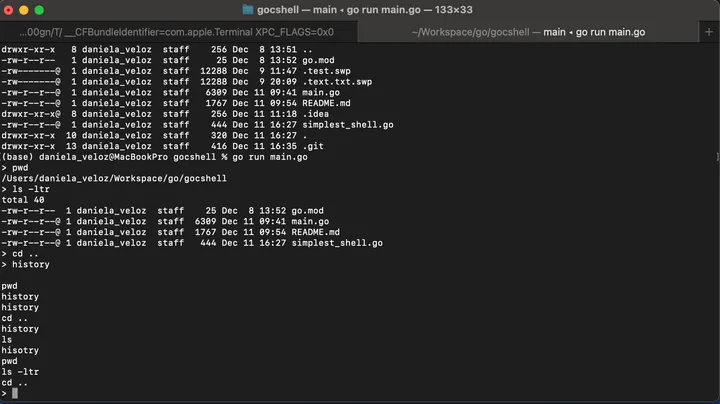
Our final feature to implement is command history support. This allows users to see all previously executed commands
by typing history.
In real shells like bash or zsh, you can press the up arrow to cycle through previous commands. While that requires more complex terminal manipulation, we’ll implement a simpler version that stores commands in a file and displays them when requested.
How it works:
- History file: Commands are saved to
~/.gocsh_historyin the user’s home directory - Saving commands: After each command executes successfully, we append it to the history file
- Displaying history: When the user types
history, we read and print all lines from the file - Filtering: We don’t save empty commands,
exit, or thehistorycommand itself
Implementation details:
initHistory(): Opens the history file for writing (creates it if it doesn’t exist)saveHistory(input): Appends a command to the history filedisplayHistory(): Reads and prints all commands from the history fileshouldBeInHistory(commands): Determines if a command should be saved (filters out empty, exit, and history commands)closeHistory(): Properly closes the file when the shell exits
This is our final shell implementation
package main

import (
	"bufio"
	"context"
	"errors"
	"fmt"
	"os"
	"os/exec"
	"os/signal"
	"strings"
)

var history_file = os.Getenv("HOME") + "/.gocsh_history"
var historyFile *os.File

type Command struct {
	name string
	args []string
}

func parseInput(input string) ([]Command, error) {
	// remove empty spaces from the input
	input = strings.TrimSpace(input)

	// return empty command slice if input is empty
	if input == "" {
		return []Command{}, nil
	}

	// split input by |
	pipedInputs := strings.Split(input, "|")
	commands := make([]Command, 0, len(pipedInputs))

	// per each piped command identify command and args
	for _, pipedInput := range pipedInputs {
		pipedInput := strings.TrimSpace(pipedInput)
		parts := strings.Fields(pipedInput)

		if len(parts) == 0 {
			return []Command{}, fmt.Errorf("invalid input: %s", pipedInput)
		}
		command := parts[0]
		args := parts[1:]
		commands = append(commands, Command{command, args})
	}
	return commands, nil
}

func initHistory() error {
	var err error
	historyFile, err = os.OpenFile(history_file, os.O_WRONLY|os.O_CREATE|os.O_APPEND, 0600)
	return err
}

func saveHistory(input string) error {
	if historyFile == nil {
		return nil // History disabled
	}
	_, err := historyFile.WriteString(input)
	return err
}

func closeHistory() {
	if historyFile != nil {
		historyFile.Close()
	}
}

func displayHistory() error {
	file, err := os.Open(history_file)
	if err != nil {
		return err
	}
	defer file.Close()

	scanner := bufio.NewScanner(file)
	for scanner.Scan() {
		fmt.Println(scanner.Text())
	}
	return scanner.Err()
}

func shouldBeInHistory(commands []Command) bool {
	if len(commands) == 0 {
		return false // Empty commands should not be saved
	}
	if len(commands) > 1 {
		return true // Save piped commands to history
	}
	// Don't save "history" or "exit" commands
	return commands[0].name != "history" && commands[0].name != "exit"

}

// setupSignalHandler creates a context that will be cancelled when CTRL+C is pressed.
// Returns the context and a cleanup function that should be deferred.
func setupSignalHandler() (context.Context, context.CancelFunc) {
	ctx, cancel := context.WithCancel(context.Background())

	sigChan := make(chan os.Signal, 1)
	signal.Notify(sigChan, os.Interrupt)

	go func() {
		<-sigChan
		cancel()
	}()

	// Return a wrapped cancel function that also stops signal notifications
	cleanup := func() {
		signal.Stop(sigChan)
		cancel()
	}

	return ctx, cleanup
}

// handleCommandError checks if an error is due to context cancellation (CTRL+C).
// If so, it prints a newline and returns nil. Otherwise, it returns the original error.
func handleCommandError(ctx context.Context, err error) error {
	if err != nil && errors.Is(ctx.Err(), context.Canceled) {
		fmt.Println() // Print newline after ^C
		return nil    // Don't treat ^C as an error
	}
	return err
}

// executeNotBuiltInCommand executes commands using the computer's OS.
func executeNotBuiltInCommand(command string, args []string) error {
	ctx, cleanup := setupSignalHandler()
	defer cleanup()

	cmd := exec.CommandContext(ctx, command, args...)
	cmd.Stdout = os.Stdout
	cmd.Stderr = os.Stderr
	cmd.Stdin = os.Stdin

	err := cmd.Run()
	return handleCommandError(ctx, err)
}

// executeCdCommand executes the "cd" built-in command to change directories.
func executeCdCommand(args []string) error {
	var path string
	if len(args) == 0 { // if no path is defined it defaults to $HOME
		path = os.Getenv("HOME")
	} else {
		path = args[0]
	}
	return os.Chdir(path)
}

// executeSingleCommand executes a single command. Built-in commands cannot be part of pipes.
func executeSingleCommand(command Command) error {
	switch command.name {
	case "":
		return nil
	case "exit":
		os.Exit(0)
		return nil
	case "cd":
		return executeCdCommand(command.args)
	case "history":
		return displayHistory()
	default:
		return executeNotBuiltInCommand(command.name, command.args)
	}
}

// executePipeline executes a series of piped commands.
func executePipeline(commands []Command) error {
	if len(commands) == 0 {
		return nil
	}
	if len(commands) == 1 {
		return executeSingleCommand(commands[0])
	}

	// Create context so it can be cancelled
	ctx, cleanup := setupSignalHandler()
	defer cleanup()

	// Check for built-in commands in pipeline
	for _, cmd := range commands {
		if cmd.name == "cd" || cmd.name == "exit" {
			return fmt.Errorf("cannot use built-in command '%s' in pipeline", cmd.name)
		}
	}

	// create commands
	var cmds []*exec.Cmd //slice of pointers to exec.Cmd so we can modify them later
	for _, command := range commands {
		cmd := exec.CommandContext(ctx, command.name, command.args...)
		cmds = append(cmds, cmd)
	}

	// Connect the output of each command to the input of the next command
	// the last command has no "next" command to connect to
	for i := 0; i < len(cmds)-1; i++ {
		stdout, err := cmds[i].StdoutPipe()
		if err != nil {
			return err
		}
		cmds[i+1].Stdin = stdout
	}

	// Set first command stdin and last command stdout to the terminal
	cmds[0].Stdin = os.Stdin
	cmds[len(cmds)-1].Stdout = os.Stdout
	cmds[len(cmds)-1].Stderr = os.Stderr

	// Start all commands
	// we use use Start(non-blocking) instead of Run(blocking), we need all cmds running in parallel so next command
	// can read from the prev pipe
	for _, cmd := range cmds {
		if err := cmd.Start(); err != nil {
			return err
		}
	}

	// Wait for all commands
	for _, cmd := range cmds {
		if err := cmd.Wait(); err != nil {
			return handleCommandError(ctx, err)
		}
	}

	return nil
}

func main() {
	// Initialize history file
	if err := initHistory(); err != nil {
		fmt.Fprintf(os.Stderr, "Warning: could not open history: %v\n", err)
	}
	defer closeHistory()

	// read a line of input from the user
	reader := bufio.NewReader(os.Stdin)

	for {
		// display the prompt
		fmt.Print("> ")
		// read the keyboard string
		input, _ := reader.ReadString('\n')

		// parse input to Command
		commands, err := parseInput(input)
		if err != nil {
			fmt.Println(err)
			continue
		}

		if err := executePipeline(commands); err != nil {
			fmt.Println(err)
		}

		// save to history
		if shouldBeInHistory(commands) {
			if err := saveHistory(input); err != nil {
				fmt.Fprintf(os.Stderr, "Warning: could not write to history: %v\n", err)
			}
		}
	}

}